What Is an EPG (Electronic Program Guide)? A Complete Guide
TL;DR
- EPG means Electronic Program Guide, the screen that tells you what’s on now and what’s on next
- Schedule info comes from the channel owners or from data companies and your device turns it into a grid
- XMLTV, JSON and DVB are the formats you hear about the most
- Cable guides and IPTV service guides get their info in different ways
- Time shift is how you watch something that already aired
- When the guide won’t load it’s usually the link or the time zone or some stuck data, and it takes a few minutes to sort out
Everybody has done this at least once. You sit down, grab the remote, browse through channels for ten minutes and then give up and watch nothing. The guide exists so that doesn’t happen. It’s on almost every screen and yet most people don’t even know what it’s called. With an IPTV service at home it’s probably the screen you open first every day. This blog covers what it is, where the info comes from and what to do when it stops working.
What Is an Electronic Program Guide (EPG)?
EPG just stands for Electronic Program Guide. It’s the screen that lists everything airing on your channels, with the title, the start time, how long it runs and a short line about what the show is. Years back people got a printed schedule in the Sunday paper and this is the same thing, only it fixes itself when plans change and you can click on stuff.
A good one answers three things quickly. What was on a bit ago, what’s on right now and what’s coming later today or even next week. Click a show and you can read more, set a reminder or record it when your setup lets you.
You might run into the word IPG too. That’s Interactive Program Guide and it’s an EPG with more tools like search and filters. People mix the two names all the time and nobody really minds.
With IPTV, the guide is generally integrated into the service or compatible player, with programme information supplied through its EPG data feed. The ATIS IPTV EPG metadata requirements provide further technical context on how programme guide information supports IPTV services.
How Does an EPG Work?
It’s all data in the end. Somebody makes a schedule, the schedule gets saved in a file, your device reads the file and draws the grid. The schedule changes and the file changes and then the grid changes. There are a few stops in between though and that’s usually where things break.
From Broadcaster to Screen: Where EPG Data Comes From
The channel owner decides what airs and when. Title, start time, end time, a description, age rating, genre and sometimes a picture. All of that goes into the schedule.
Next it moves to the provider. Sometimes it goes straight there. Sometimes it goes through a guide data company first, one that collects schedules from loads of channels and cleans them up so they all look alike. Then the provider loads the cleaned version into its system.
The last stop is your device. A cable box picks it up from the signal. An IPTV box or an app pulls it from the internet using a link. Then it matches everything to the right channel and shows the grid. If any one of those fails you get blank boxes or a show sitting at the wrong hour.
EPG Data Formats: XMLTV, JSON and DVB
Your device needs guide data in a format it can read and three of them come up a lot.
- XMLTV: the one most IPTV setups use, just a text file listing channels and programs and times
- JSON: newer apps like it because it’s light and updates fast
- DVB: broadcast systems use this and it rides along with the TV signal, and the US over the air version is called ATSC which works in a similar way
You don’t need to learn the tiny details. What matters is that your device and your guide source have to match each other. When they don’t, the guide stays empty.
The EPG Timeline: How the Guide Grid Is Laid Out?
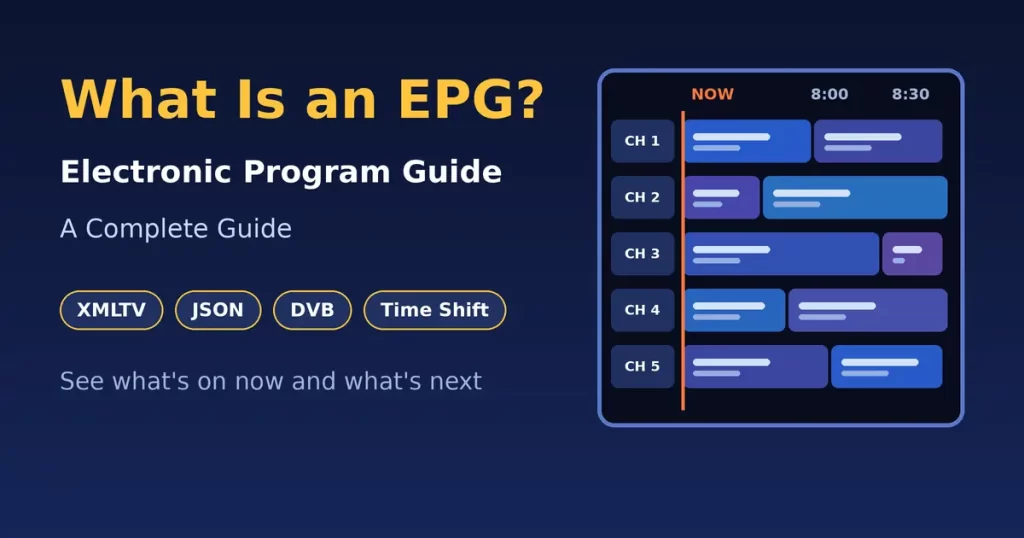
Open the guide and it’s a grid. Channels run down the left and time runs across the top. Every show is a block and longer shows get wider blocks, so a two hour movie is double the width of a one hour show. There’s a thin line for the current time. Scroll right and you see later stuff. On guides with time shifts you can scroll left too and find shows from earlier. This layout is also explained in the Roku EPG TimeGrid documentation.
When the timeline lags or shows the wrong hour the whole guide feels bad even if the data is perfectly fine.
Types of Electronic Program Guides
Guides don’t all look alike. The full grid is the classic and it’s the best for browsing lots of channels at once. Then there’s the small banner that pops up while you watch, which only shows what’s on that channel now and what’s next. Nothing more.
Some apps use a single channel list instead. You pick a channel and see its upcoming shows in a plain list which works well on a small phone screen where a big grid would look cramped.
The interactive guide adds search and filters and favorites. Type a word or pick a genre and you skip most of the scrolling. Mobile guides are made for touch and keep things simple.
Most services mix a few of these. An IPTV provider might give you the full grid on the TV and a simple list on the phone.
EPG on TV vs EPG in IPTV/OTT
The idea is the same for both but the way the guide gets to you is different. Here’s a side by side look.
| Feature | EPG on TV (cable, satellite, over-the-air) | EPG in IPTV/OTT |
| How guide data arrives | Comes with the broadcast signal or the provider’s network | Comes over the internet from a link or an app server |
| Who controls it | The cable, satellite or broadcast provider | The IPTV provider or the app maker |
| Where you see it | Press the Guide button on the remote or box | Inside the app or on the home screen of your IPTV box |
| Setup needed | Almost none since it’s built in | Sometimes you add a guide link and sometimes you just log in |
| Schedule depth | Often a week or two ahead | Depends on the provider, could be shorter or longer |
| Catch-up and time shift | Limited and usually needs a recorder | Often built in for lots of channels |
| Typical problems | Missing info after a signal drop | Guide not loading, wrong times or empty boxes |
| Update method | Updates on its own through the signal | Updates through the internet and sometimes needs a manual refresh |
IPTV guides give you more room to play but they lean on your internet and your setup. Regular TV guides are simpler and you just get fewer extras.
What Does EPG Mean on Firestick and Streaming Devices?
This one comes up a lot because streaming remotes usually don’t have a Guide button. On a Firestick, an Android TV box or an Apple TV the EPG isn’t part of the device itself. It lives inside whatever app carries live channels.
Open a live TV app and you’ll see the same kind of grid a cable box has with channels on the side and time on top. Use an IPTV service on your Firestick and the guide will be inside that IPTV app and nowhere else on the device.
Some players ask you to paste the guide link in yourself. Your provider gives you the link, you drop it in and the player loads everything. Others do it on their own after you log in so there’s nothing to paste at all.
A dedicated IPTV box often puts the guide right on the main screen which makes it quick to jump in. Smart TVs with a live TV app are pretty much the same.
EPG Features and Navigation
Most guides have the same basic stuff. You scroll up and down for channels. Click a show and you get the description, length and rating. Set a reminder and the screen lets you know when the show is about to start. If your setup supports recording you can save a show for later.
The search button finds a show by name or by a word. Favorites keep your usual channels at the top. Filters cut the list down by genre like movies or news or kids.
Moving around is simple. Arrow keys or your finger on a touch screen get you where you’re going, OK opens a show and Back shuts the guide. Plenty of remotes have a Guide or EPG button that jumps straight to the grid. Yours doesn’t have one. Try Home or Menu, or tap up or down while a live channel is on.
Spend a couple of minutes on a favorites list because it saves tons of scrolling. Your IPTV service might have hundreds of channels and chances are you only watch a few of them.
What Is EPG Time Shift?
Time shift is the feature people like the most. It lets you watch a show at a different time than when it aired. Pause live TV, rewind a bit or go back to something that has already played.
Imagine this. A show started twenty minutes ago and you just turned the TV on. Hit the start button and it plays from the beginning. Or the phone rings halfway through, you pause, take the call and come back later. Nothing lost.
Catch-up works along the same lines. You scroll back on the timeline to a show from earlier today or a few days ago and press play and the live schedule turns into something you can move through in both directions.
Not every channel has it though. It depends on the provider and on the channel itself. Some keep a few days of shows and some keep less. Time shift matters to you. Then check if your IPTV service supports it before you sign up.
Benefits of EPGs
An EPG looks like a small thing but it really changes how people watch TV. It helps the viewer and it helps the people running the service too. Providers feel the difference too because people who find things easily tend to stay with a service. Here’s how it helps each side.
Benefits for Viewers
- Saves time: you see what’s on without flipping through channels one by one
- Easy planning: look ahead and plan the evening around shows you like
- New finds: descriptions and genres show you things you wouldn’t have picked yourself
- No missed shows: reminders and recordings keep your favorites from slipping by
- Watch your way: time shift and catch-up fit around your day
- Works on every screen: many guides sync across TV, phone and tablet
Benefits for Service Providers
- Happier customers: a clear guide makes a service feel simple and worth the money
- More watch time: people who find shows quickly watch more and stay longer
- Fewer support calls: a good guide answers a lot of basic questions before anyone picks up the phone
- Promotion: new shows or special events can be pushed right inside the grid
- Useful numbers: seeing what people search for helps decide what to add next
For an IPTV service the guide matters a lot because people judge the whole service by how easy it is to find stuff. A messy guide can make a great channel list feel bad.
EPG Not Loading? Common Problems and Fixes
Sometimes the guide just won’t work. The grid is empty or the times are off or a message says no information available. Annoying for sure but it’s usually easy to fix.
- Weak internet: an IPTV guide needs a steady connection so restart the router and check your speed and try a cable if your Wi-Fi is far away
- Wrong time zone: if your device is set to another zone the whole guide looks shifted so switch it to automatic or pick your local one
- Old saved data: apps keep old guide data and it can get stuck so clear the app cache or force a refresh
- Bad guide link: check the link is pasted fully with no missing letters or extra spaces and ask your provider for a fresh one if it still fails
- Channels not matching: the guide loads but some channels stay blank which means channel names or IDs don’t line up with the data so use the map or match option in your player or ask your provider
- Old app version: older versions have bugs so update from the store
- Restart: unplug your IPTV box for thirty seconds and plug it back in. It sounds too simple but it fixes more than you’d think
- Provider problem: sometimes it isn’t on your end so ask your provider if the guide feed is down
Tried everything and still blank. Wait an hour or two. Some guides refresh on a schedule and just need time to catch up.
Where US Viewers and Providers Get EPG Data?
In the US the source depends on how you watch. Cable and satellite handle everything for you. The data comes with the signal and you do nothing at all. Over the air antennas carry guide info inside the broadcast so your TV tuner reads it by itself, though it usually only covers a short stretch of time ahead.
IPTV is a bit different. Some providers buy their guide data from companies that collect schedules for lots of US channels, some get it straight from the channel owners and others use community made XMLTV sources that volunteers keep updated. Paid sources tend to be more accurate and steady while free ones can have gaps or delays.
Viewers mostly just need the right guide link from the provider or the right setting in the app. Running a service is different, since you need a source that handles US time zones well. The same show can air at different local times on the east and west coasts and good data deals with that for you.
Whatever source ends up being used, accuracy is what counts most. A guide with wrong times is worse than having no guide at all.
Frequently Asked Questions
What is the EPG button on my remote?
It’s the button that opens the guide. It might say Guide, EPG or TV Guide. It could also be a small grid icon. Press it once to open and press it again or hit Back to close. No button on your remote. Try Home or Menu.
Is EPG the same as a TV guide?
Yes. EPG is the digital version of the TV guide people used to flip through in a newspaper or magazine. The difference is it lives on your screen, updates itself and you can click on things.
What is the difference between EPG and IPG?
IPG means Interactive Program Guide. It’s an EPG with extra tools like search, filters and one click tune in. Most guides have those tools now so people use both names for the same thing.
How often is EPG data updated?
It depends on the source. Many guides refresh a few times a day and some update every few hours. Schedules can change at the last minute so good providers keep the data fresh. Yours looks old. Try a manual refresh in the app.
Is EPG included with IPTV services?
Most of the time, yes. A decent IPTV service gives you a guide with the package that is either built into the app or through a link. Some setups need you to add the link yourself so ask before you join.
Can I use EPG without a set-top box?
Yes. Smart TVs, phones, tablets and streaming sticks can all show a guide through an app. A set-top box or an IPTV box just keeps everything in one place but it isn’t a must.
Conclusion
An EPG is a simple idea that makes TV way easier to use. It shows what’s on now and what’s next and with time shift you can go back to what you missed. Behind that grid there’s a whole chain of schedules and formats and feeds all working together.
Cable, antenna, Firestick or an IPTV box, the guide is what ties it all together. When it works you barely notice it. When it breaks you notice right away. Now you know where the data comes from, how to move around the grid and what to try when it acts up.
Looking for an Indian IPTV service that keeps browsing and watching simple. Tashan IPTV is built with US viewers in mind, with catch-up and time shift on top of a big channel list. A clear guide, easy navigation and a setup that runs well on your IPTV box or favorite device can change how much you enjoy your evenings.